Documento originale
GPT Image 2 · en
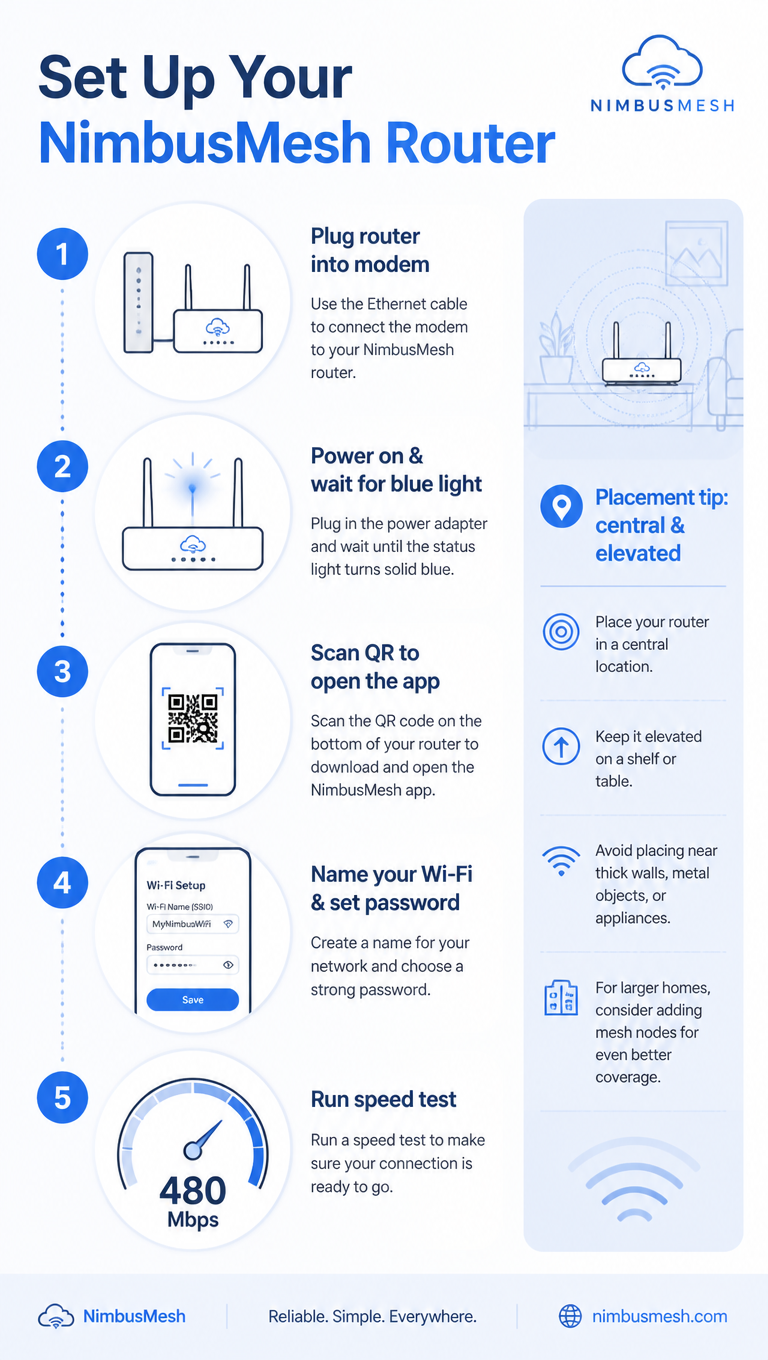
A tech how-to infographic, 9:16, titled 'Set Up Your NimbusMesh Router'. Five numbered steps in a clean vertical flow: 1 Plug router into modem, 2 Power on & wait for blue light, 3 Scan QR to open the app, 4 Name your Wi-Fi & set password, 5 Run speed test (shows 480 Mbps). Each step pairs a flat line icon with concise text and a connecting dotted line. A sidebar note 'Placement tip: central & elevated'. Cool blue-and-white palette, rounded device icons, subtle signal-wave motifs, clean minimalist tech-guide aesthetic.Come usare
- Copia tutto il prompt originale, inclusi i parametri.
- Adatta soggetto, testo e composizione alle tue esigenze.
- Usa uno strumento esterno compatibile; verifica accesso e risultato.
Prima di iniziare
- Controlla se serve un’immagine di riferimento. La compatibilità non prova il modello usato per l’esempio.
- Verifica nomi, numeri e testi; i risultati cambiano con le versioni del modello.