原始文档
GPT Image 2 · en
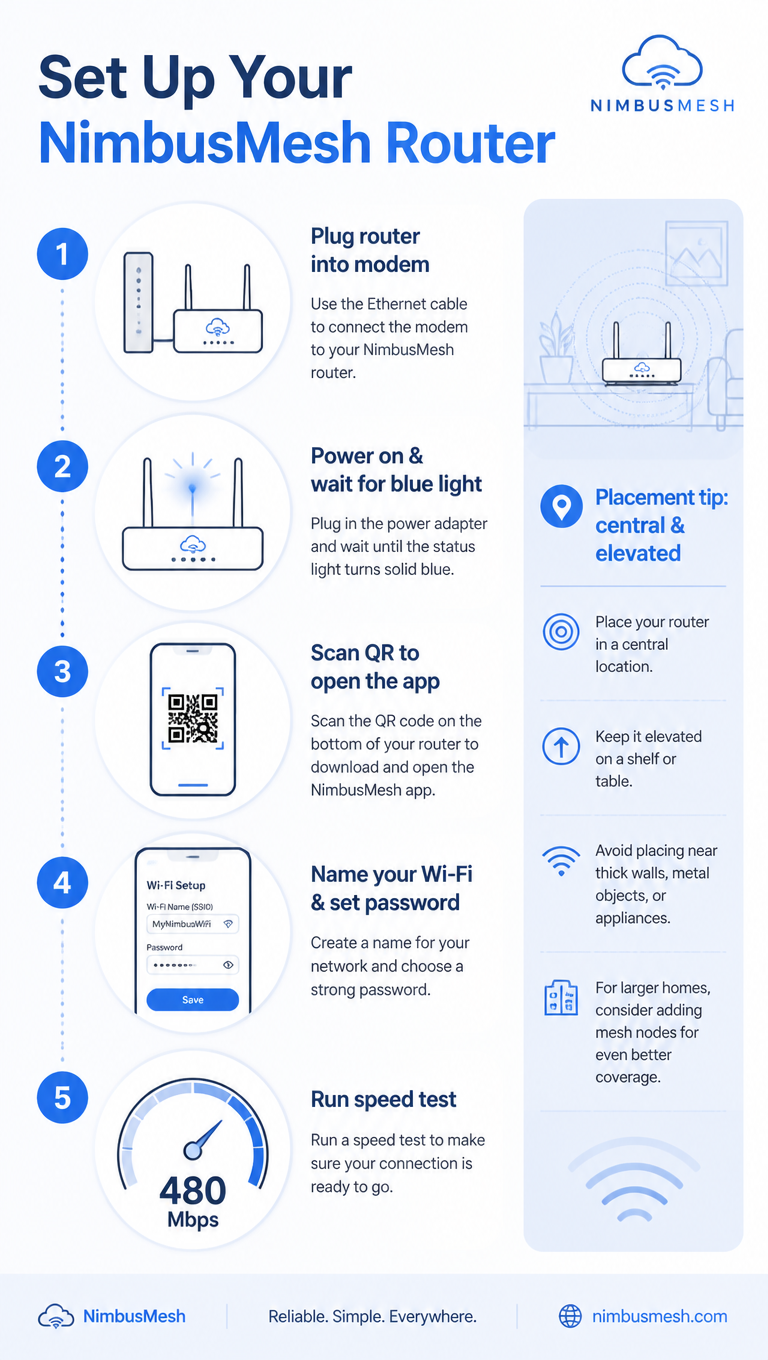
A tech how-to infographic, 9:16, titled 'Set Up Your NimbusMesh Router'. Five numbered steps in a clean vertical flow: 1 Plug router into modem, 2 Power on & wait for blue light, 3 Scan QR to open the app, 4 Name your Wi-Fi & set password, 5 Run speed test (shows 480 Mbps). Each step pairs a flat line icon with concise text and a connecting dotted line. A sidebar note 'Placement tip: central & elevated'. Cool blue-and-white palette, rounded device icons, subtle signal-wave motifs, clean minimalist tech-guide aesthetic.使用方法
- 复制完整原始提示词,并保留其中的参数。
- 按需求替换主体、文字和构图要求。
- 在兼容的外部工具中使用,核对当前使用条件并检查结果。
开始前需了解
- 先确认是否需要参考图。标注兼容模型,不代表该示例由这个模型生成。
- 核对名称、数字与画面文字;不同模型版本的结果可能不同。