원본 문서
GPT Image 2 · en
{
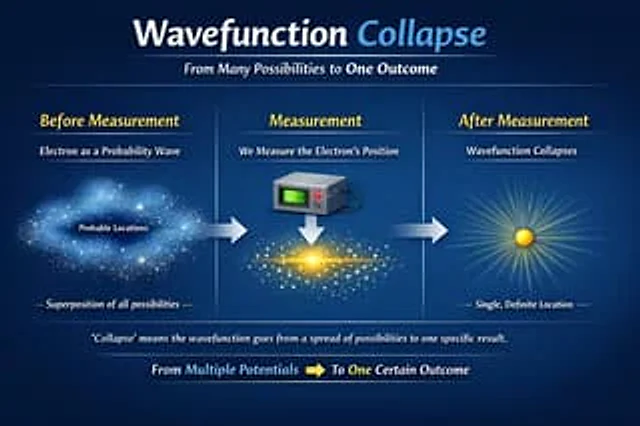
  "type": "Educational Infographic",
  "theme": "quantum physics",
  "background": "Dark blue gradient",
  "header": {
    "title": "{argument name=\"main title\" default=\"wave function collapse\"}",
    "subtitle": "{argument name=\"subtitle\" default=\"From multiple possibilities to a single outcome\"}"
  },
  "layout": {
    "type": "Three-stage horizontal evolution",
    "connections": "There is a thick horizontal arrow pointing to the right between each stage.",
    "stages": [
      {
        "position": "Left side",
        "title": "Before measurement",
        "subtitle": "As a probability wave{argument name=\"subject\" default=\"electronic\"}",
        "visual": "A diffuse, luminous cloud of blue particles, resembling a nebula.",
        "labels": [
          "Possible locations",
          "Superposition of all possibilities"
        ]
      },
      {
        "position": "central",
        "title": "Measurement",
        "subtitle": "Measurement{argument name=\"subject\" default=\"electronic\"} Location",
        "visual": "A gray square measuring device with a green screen and red buttons points downwards to a white arrow, corresponding to a bright yellow condensed matter horizontal particle band in the center."
      },
      {
        "position": "right side",
        "title": "After measurement",
        "subtitle": "wave function collapse",
        "visual": "A single solid yellow sphere emitting bright, radiating light",
        "labels": [
          "Single, definite location"
        ]
      }
    ]
  },
  "footer": {
    "explanation": "\"Collapse\" means that the wave function changes from a distribution of multiple possibilities to a specific outcome.",
    "summary": "From multiple potentials [yellow right arrow] to a definite result"
  }
}
사용 방법
- 매개변수를 포함한 전체 원본 프롬프트를 복사하세요.
- 주제, 문구, 구도를 자신의 요구에 맞게 바꾸세요.
- 호환되는 외부 도구에서 사용하고 이용 조건과 결과를 확인하세요.
시작 전 확인
- 참조 이미지가 필요한지 확인하세요. 호환 표시는 해당 모델로 이 예시를 생성했다는 뜻이 아닙니다.
- 이름, 수치, 이미지 속 문구를 확인하세요. 모델 버전에 따라 결과가 다를 수 있습니다.