Oryginalny dokument
GPT Image 2 · en
{
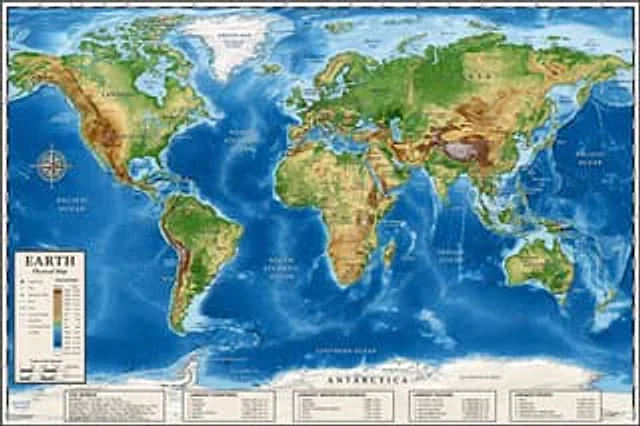
  "type": "Highly detailed cartographic world map",
  "style": "{argument name=\"color palette\" default=\"Realistic terrain and depth sounding colors\"}",
  "map_features": {
    "terrain": "The shading relief, in green, brown and white, shows mountains, valleys and plains.",
    "oceans": "Different shades of blue create varying depths of shadow; light blue represents the continental shelf, while dark blue represents the deep-sea trench.",
    "grid": "Latitude and longitude lines covering the entire map",
    "labels": "Major continents, countries, oceans, and sea areas are clearly marked in serif and sans-serif fonts."
  },
  "layout": {
    "overlays": [
      {
        "type": "Compass Rose",
        "position": "Left side of the middle, located above the Pacific Ocean",
        "description": "Classic 8-direction nautical compass"
      },
      {
        "type": "legend",
        "position": "bottom left corner",
        "title": "{argument name=\"map title\" default=\"Earth\"}",
        "subtitle": "{argument name=\"map type\" default=\"Physical map\"}",
        "contents": "Altitude color key, map symbols and distance scale"
      }
    ],
    "bottom_panels": {
      "count": 5,
      "position": "horizontal row along the bottom",
      "labels": [
        "World Overview",
        "Largest country",
        "Longest mountain",
        "Largest Ocean",
        "Longest River"
      ]
    }
  }
}
Jak używać
- Skopiuj cały oryginalny prompt wraz z parametrami.
- Dostosuj temat, tekst i kompozycję do swoich potrzeb.
- Użyj zgodnego narzędzia zewnętrznego; sprawdź warunki dostępu i wynik.
Przed rozpoczęciem
- Sprawdź, czy potrzebny jest obraz referencyjny. Zgodność nie potwierdza modelu użytego do przykładu.
- Sprawdź nazwy, liczby i napisy; wyniki zależą od wersji modelu.