
SCM’s opening against Apple Photos is not a new claim that pictures can be searched with ordinary language. Apple already offers that. The open-source Mac application instead combines visual, scene, text and speech retrieval for media selected from folders, including project exports and external-drive archives. Its debut makes that combined pipeline inspectable, but does not establish accuracy or adoption: the early Hacker News snapshot showed four points and no comments.
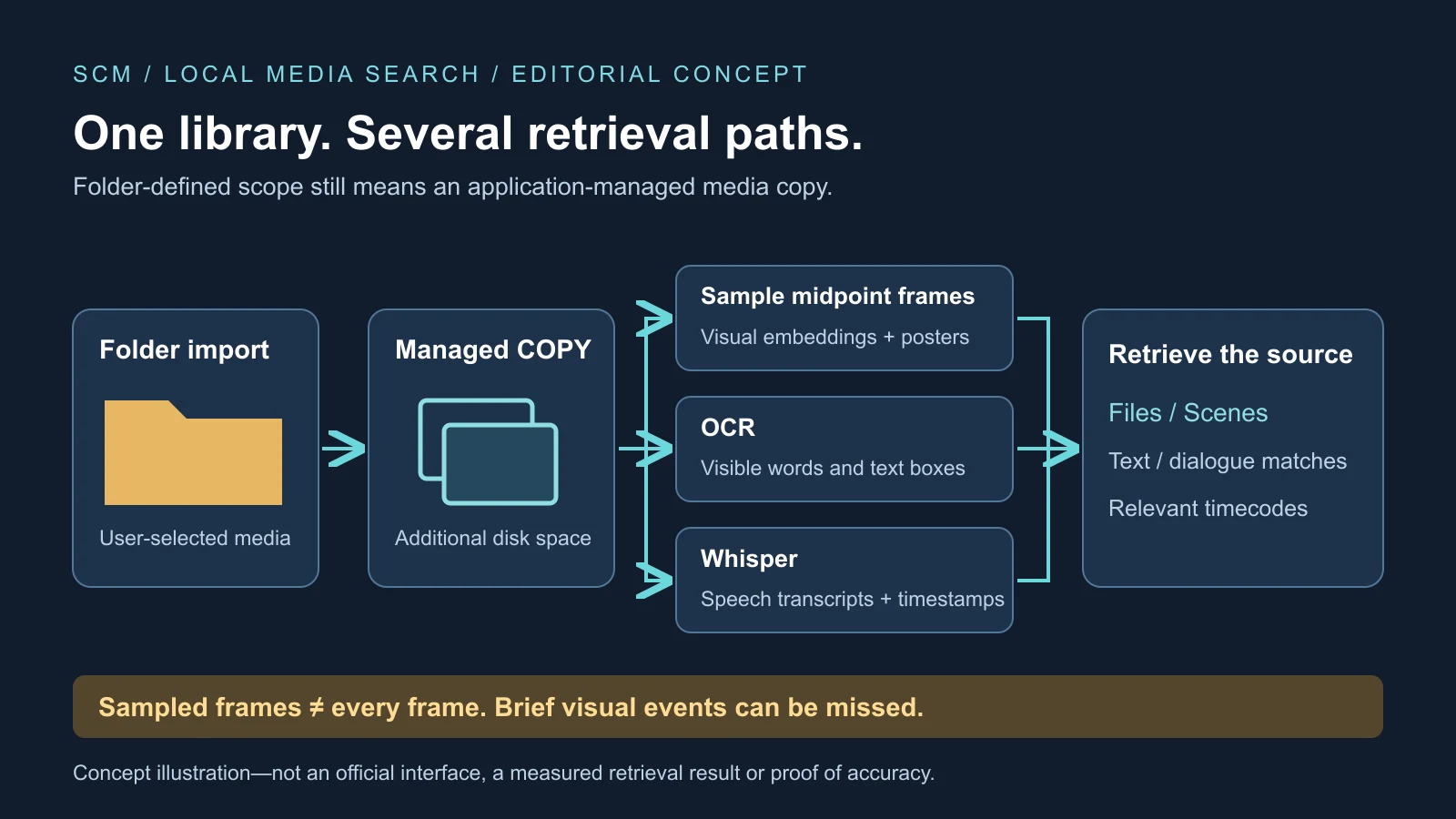
The distinction comes with a catch for anyone imagining a lightweight index over an existing disk. SCM copies imported media into its own managed library. And although it promises to find moments throughout video, its documented visual pipeline samples representative frames rather than analyzing every decoded frame independently. Both choices are central to what the software can deliver and what it costs to run.
Several searches, not one all-knowing model
The SCM repository describes Files, Scenes, OCR and Dialogue modes, plus an optional local question-answering model. Files retrieves entire photos or videos by visual meaning; Scenes returns moments with timecodes. OCR searches visible words. Dialogue uses Whisper transcripts to locate exact words at timestamps. The optional Ask layer works from already extracted text rather than independently understanding everything in the original media.
Those routes are complementary. A documentary editor might remember a spoken interview sentence, a red car in B-roll, or an email address on a scanned release. Transcript search, visual embeddings and OCR answer different parts of that problem. A visual association such as “dog beside a red car” does not guarantee recognition of a tiny serial number; a transcript cannot recover a phrase that speech recognition got wrong.
SCM exposes some of that separation through result explanations. File badges distinguish visual and filename matches; dialogue results show matching transcript snippets. Scores and tooltips make the route to a result more visible. These are aids to diagnosing mistakes, not evidence that the ranking is correct. The user can distinguish a transcription failure from an unsuccessful visual query instead of treating every miss as the same mysterious AI error.
Saved-search tabs preserve a query and its mode as watched folders change. The screenshot view combines filenames, metadata, folder context and manual overrides rather than relying only on appearance. A specialized email view attempts to reconstruct addresses split across OCR boxes or damaged by punctuation errors. Those practical details broaden retrieval beyond a conventional photo gallery without making OCR infallible.
Folder-defined collections still create another copy
Media can enter through application import, drag-and-drop or watched folders. The project says watched folders update live and are rescanned when SCM starts. Before copying, it calculates a SHA-256 content hash so renamed duplicates can be recognized, and checks actual media types rather than trusting extensions. Cached scene plans can also avoid repeating some work on reimport.
The copy goes under the application’s support directory. An external archive therefore does not remain an index-only reference: source media and SCM’s managed copy coexist, alongside embeddings, thumbnails, scene posters, transcripts, OCR boxes and sidecar files. Several terabytes of footage create a very different storage commitment from a small screenshot collection. Embedding-version snapshots add another cost, although SCM caps those snapshots at ten.
The distribution described by the project targets Apple silicon Macs running macOS 12 or later through Homebrew. Electron packages the application, React supplies the interface, and separate workers handle vision, OCR and speech. The MIT license permits inspection and adaptation of the code, builds and tests. None of that proves that an unexamined release or dependency is safe, or that a single maintainer can sustain every upstream change.
This is also where the comparison with Photos needs precision. Apple’s Photos documentation already describes natural-language image and key-video-moment search, with filters for photos, videos, screenshots, favorites and keywords. Photos brings people, pets, albums, edits, memories and iCloud integration. SCM’s narrower opening is a user-defined corpus of production folders, camera-card backups and client archives outside that library—not proof that it will replace Photos for most Mac owners.
What scene search actually samples
FFmpeg first examines shot boundaries, after which SCM builds a segment plan at a chosen density. Presets range from one search point every 60 seconds to one every 2.5 seconds. The default balanced setting uses 30-second intervals with a stated budget of 8–128 segments. For each planned segment, the software embeds its midpoint frame and keeps a poster image. A text query becomes a numerical representation that can be ranked against those stored frames.
Whole-file video search uses a different summary: frames at 20%, 50% and 80% of the video, with their embeddings averaged. That can represent the file’s overall character but cannot capture every unusual scene. Scenes mode is the relevant route for a remembered moment. Even there, a one-second title card, passing license plate or brief appearance in a long uncut shot can fall between representative frames.
The computational reason is easy to see. A 30-minute video at 30 frames per second has 54,000 frames; indexing every one would multiply processing and index size while preserving much redundant material. Denser sampling reduces gaps at additional time and storage cost. It does not convert a sampled index into a guarantee of complete frame-level coverage.
SCM applies a noise gate, model-calibrated thresholds and near-duplicate filtering, and limits each video to three scene results. That can improve diversity and suppress weak matches, but it can also conceal several valid moments from one file. Similar colors, composition or learned associations can rank highly without identifying the requested subject. A scene map is a more accurate description than a promise that every frame has been understood.
Model choices change both speed and behavior
The default vision engine is CLIP ViT-L/14 with a 336-pixel input and an approximately 435MB model download. OpenAI’s CLIP overview explains image–text association learning, which enables retrieval without manually labeling every concept. SCM also offers three SigLIP variants. The associated SigLIP 2 research emphasizes multilingual understanding, image–text retrieval and localization; those research properties do not by themselves establish accuracy on an individual archive.
Project-reported CPU inference figures run from roughly 50–100 milliseconds per image for the fastest option to about 200 or 480 milliseconds for slower choices. They are not independent benchmarks across Macs. Switching models triggers background re-embedding, during which SCM temporarily falls back to filename search. A model change is therefore not a cost-free relevance switch over an unchanged index.
OCR includes English and 35 additional language toggles, but packs cannot guarantee recognition across resolutions, contrast levels, fonts and orientations. Whisper can mishear accents, overlapping voices, noise and specialist vocabulary. Visual embeddings can also inherit social or cultural biases; the CLIP model card calls for thorough intended-domain testing. A query about a “tense meeting” asks for interpretation, while identifying who approved a contract may require knowledge absent from the pixels.
These limitations make per-mode evaluation more informative than a blended success rate. Known target moments and queries written before seeing results can reveal recall, false matches and time-to-result for Scenes, Files, OCR and Dialogue separately. SCM includes unit tests, Electron smoke tests and benchmark scripts, but software regression checks are not a representative independent retrieval benchmark.
Local privacy does not eliminate trust
SCM says there are no accounts, telemetry or media uploads. Once required vision weights, OCR data and Whisper files are downloaded, processing can occur locally and visual indexing can run offline. The optional language model remains disabled until enabled; it receives extracted dialogue, OCR and filename evidence. Its sidecar uses the loopback interface, ordinarily restricting connections to the same machine.
Ask reportedly cites its local evidence and stops before generation when evidence is empty. That reduces one route to unsupported answers, not all errors: a small local model can still summarize a real transcript incorrectly. Citations are a path back to the media, not a substitute for checking it. This resembles a media-centered personal knowledge base, but retrieval and answer generation remain different reliability problems.
Distribution brings another trust boundary. The Homebrew instructions require trust in the project’s tap or cask and affect macOS quarantine handling; they are not equivalent to Mac App Store review. Unsigned local builds can trigger warnings. Signing identifies a developer and helps establish that signed code has not changed, not that it is inherently safe. SHA-256 download checks similarly establish agreement with expected bytes, not the trustworthiness of those bytes.
The dependency chain includes Electron, FFmpeg, ONNX Runtime, Tesseract, Whisper, vision models and optional llama.cpp. Open code lets developers inspect network behavior and replace components, but most users will not audit the entire chain. Malware, shared accounts, insecure backups and an unlocked Mac can still expose a local library. The privacy advantage is reduced mandatory cloud exposure, not immunity from device compromise.
The remaining test is a durable library
Background controls and a global pause recognize that indexing competes with normal work, heat budgets, battery and memory. Even fast per-image inference becomes sustained work over hundreds of thousands of samples, with OCR and transcription in separate queues. Content hashes, cached plans, snapshots and retries are useful foundations, but interrupted imports, disconnected drives, damaged indexes and model migrations will test recovery at scale.
SCM enters an existing category of local Mac photo and professional video tools, not an empty market. Its useful combination is open code, folder-defined scope, local processing and several retrieval modes. Reproducible releases, issue response, security reporting, outside contributions and independent evaluations will matter more than star counts or an elaborate chat interface.
A controlled, representative folder can expose these tradeoffs before a whole archive is copied. Long videos, screenshots, visible text, dialogue and similar-looking files reveal different failures; import time, added disk use and source timestamps make the results measurable. Originals and backups should remain outside the managed copy. The substantive promise is finding the right source near the right moment repeatedly—not simply adding another AI search box to a Mac.